About Topix Cloud Diagnostics (G4739111)
What is TOPIx Cloud Diagnostics?
TOPIx Cloud Diagnostics covers Jaguar Land Rover (JLR) vehicles from 17MY for Discovery, Range Rover and Range Rover Sport, and 18MY onwards for all other vehicles excluding XJ.
SDD covers earlier vehicles / model years including XJ.
TOPIx Cloud Diagnostics is an integrated diagnostic cloud-based tool within the TOPIx environment. It is always up-to-date for all JLR retailers to connect directly to vehicles. This means that:
- There is no need for large software installations that provide out of date solutions
- It delivers new experiences to users, with time efficiency benefits
The Diagnostic Device Agent synchronises with TOPIx Cloud Diagnostics to display vehicle data and all expected features and functions of JLR approved diagnostic tools.

Who is it for?
- It is intended for users who want to connect TOPIx to maintain JLR vehicles
- It is also intended for users seeking guidance to the correct and latest information
- It provides users all the information, parts and labour details at the start of the repair
Connecting the Vehicle Communication Interface (VCI) to a Vehicle
Connect the latest JLR VCI to the vehicle and diagnostic machine. The Diagnostic Device Agent (DDA) will detect VCI connection to the vehicle and will read the Vehicle Identification Number (VIN) from the vehicle.
A VIN pop-up message will be displayed, with the message: 'Established connection with vehicle (VIN). Would you like to open a TOPIx vehicle page?'
Click Yes to open a new TOPIx page or No to remain on the same TOPIx page and the Diagnostics tab must be selected, or a refresh of the retained TOPIx page will be needed to show the connected vehicle status. The red indicator on the DDA icon will go green upon successful connection to a vehicle.
The DDA will indicate that TOPIx Cloud is connected and a Currently Viewing vehicle with a spanner icon will be shown with READY highlighted in green within the TOPIx banner. Next the automatic vehicle module data collection will occur. This is called an Automatic Network Integrity Test (NIT).
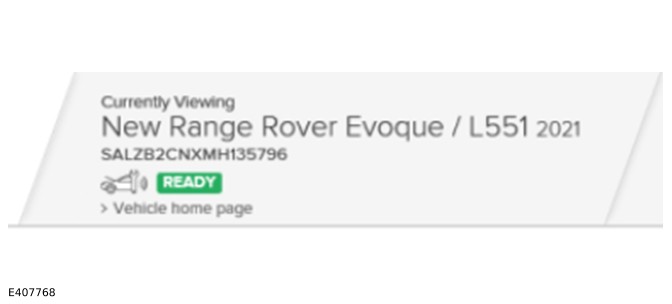
The DDA will do a NIT if this has not been done within the last 24 hours. if there has been one done within the last 24 hours then the last data read will be shown.
If a NIT is not completed, then it will not be possible to run any other application that needs communication to the vehicle.
Other TOPIx features can be used without this, but you will not be able to use any applications within the Diagnostics tab in TOPIx until the READY icon is shown and a NIT is completed.